PICK UP
1. Questions regarding Pacific League TV
Q1: What can I do if I register for Pacific League TV?
By purchasing and registering for Pacific League TV (all-you-can-watch pack/1-day ticket), you can watch live streams and paid videos. Please see here for the games included in the live stream.
By registering for a free Pacific League count, you can register your favorite teams/players, bookmark videos and articles, and use the customized notification function (app only).
Q2:What payment methods are available?
<For new users>

<For those who have already registered>
You can pay using your registered payment method (credit card payment, Rakuten Eagles Pay payment, Yahoo! Wallet, docomo carrier payment, au Easy Payment).
If you wish to change your plan or re-register after canceling your membership, we only accept credit card payments. If you are currently using a payment method other than a credit card, please consider changing your payment method.
<For those who wish to use a debit card>
The withdrawal method differs from credit card. Please check with the issuer of each debit card for details.
Q3: When will the monthly fee be charged?
Regardless of the contract date, the fee for the current month will be charged from the contract date to the end of the month.The fee for the next month will be charged from the 1st of the following month.
Q4: Can I cancel Pacific League unlimited viewing package midway through the subscription?
You can cancel your subscription from the settings screen after logging in. However, once you cancel, you will no longer be able to receive the service.
[Menu] > [Settings] > [Check/change current plan]
Q5: If I cancel Pacific League unlimited viewing package in the middle of the month, what will the charges be?
If you cancel at any time during the month, you will be charged for one month.
Q6: Will Pacific League viewing package be automatically canceled when the season ends?
Your subscription will not be automatically cancelled. Starting in November, we plan to distribute live broadcasts of team events and special videos for the season.
Q7: I applied but was unable to watch the live video. Can I get a refund?
Refunds are not available for all purchase plans. Please resolve the issue at Unable to watch the live stream or contact the management office.
Q8: Is there anything I need to do when changing my plan from "docomo carrier payment" to "ahamo"?
If you were using "docomo carrier billing," it was set to the "sp-mode content payment service (sp-mode payment)" method, but "sp-mode payment" is not available for "ahamo."
Therefore, if you switch to the "ahamo" plan, your monthly subscription will be automatically canceled, and you will no longer be able to use Pacific League TV service you are currently registered for.
If you wish to continue using the service, please cancel your registration using "sp-mode payment" and then re-register using an available payment method.
Precautions
- Any services you have registered for will no longer be available once your subscription is cancelled.
- If you cancel at any time during the month, you will be charged for one month.
- If you re-register within the same month, duplicate charges will occur even for the new payment method.
Q9: Is there anything I need to do when changing my plan from "au Carrier Payment" to "povo"?
If you use "au carrier payment", the payment method will be "au Easy Payment".
"au Easy Payment" will continue to be available with "povo," so there is no need to cancel or re-register.
Q10: What information do I need to enter when registering?
You will need to enter your email address, name, gender, date of birth, and prefecture of residence. You will also need to register and enter your credit card number.
Q11: What purpose will the information I enter be used for?
Please check the privacy policy for information on how we handle your input information and personal information.
Q12: Can I make a corporate contract?
We also accept contracts on a corporate basis. Please feel free to contact us using the form below to inquire about using our facilities for employee benefits or various events.
メールアドレス :
Q13: When I registered for the free campaign, I received an email with the regular price listed. Does this mean there is really no charge?
The standard amount may be displayed in various payment instructions and registration completion emails.
Even in this case, those who cancel during that period will be charged 0 yen and will not be charged.
Q14: When I registered for the free campaign, the fee was immediately deducted from my account. Will the fee be refunded?
If you choose an immediate payment method such as a debit card, the regular amount will be deducted once due to the nature of the payment method. If you cancel within that period, we will refund you within 60 days.
*The number of days it takes for a refund to be processed varies depending on the financial institution.
Q15: What games can I watch?
You can watch the following matches:
- Official regular season hosted by Pacific League League teams
- In addition to Pacific League games hosted during the interleague series, there will also be games hosted by The Giants Hanshin Tigers.
- Persol Climax Pa
- Exhibition games (home games held by the six Pacific League League teams)
- regular season regular season of Eastern League and Western League hosted by Pacific League teams (some games may be excluded).
Q16: What games cannot be watched?
The following matches will not be available for viewing:
- Interleague games hosted by Central League (excluding games hosted by The Giants Hanshin Tigers)
- All-Star Game
- Japan Series
*The above information is subject to change.
Q17: What is the image quality of the live streaming video?
The highest image quality is 6Mbps (1080p), and will automatically switch to 6Mbps (1080p), 4Mbps (1080p), 2Mbps (720p), 1.2Mbps (540p), or 300kbps (360p) depending on your communication environment.
*If you watch live matches in high resolution on your smartphone or tablet, more than 2.5GB of data will be used per match.
*Please be aware of the daily and monthly data usage limits when watching using LTE, 4G, or 5G lines on a smartphone or tablet, or when watching via tethering.
*We recommend using a Wi-Fi connection for long viewing periods.
Q18: Can I only watch on the device (computer or smartphone) I registered with?
You can use the service on a device other than the one you registered, but you cannot watch on multiple devices at the same time. If you want to watch on a different device, please finish watching on the previous device and then watch again on the new device.
Example: When watching on a computer and then on a smartphone
Q19: Can I automatically record something if I miss it?
While you cannot record the live footage, videos of each inning of the game will be uploaded as they progress, and you can watch them.
You can also check this on
the schedule and results page.
Q20:What features are available when playing videos?
The main functions when watching videos are as follows. For usage, please check the operating environment/operation method questions below.
- Commentary ON/OFF (only for some live broadcasts)
- Live Position Adjustment Button
- Playback speed adjustment
- Change playback quality
- Picture-in-Picture
Q21:日本国外からの視聴について
[Important] Starting January 16, 2023 (Monday), this service will no longer be available from within the EU.
Due to compliance with the GDPR (General Data Protection Regulation), access to Pacific League Pacific League TV from within the EU will be unavailable from 12:00 PM JST on Monday, January 16, 2023.
For customers who frequently use our service from within the EU, please check your membership status in advance if you are using Pacific League TV unlimited viewing package.
Date and time when the service will become unavailable
After 12:00 on Monday, January 16, 2023
Starting from January 16, 2023, all access to pacificleague.com and PERSOL Pacific League TV from the EU countries will be denied in response to the General Data Protection Regulation (GDPR). If you are subscribed to the Unlimited Viewing plan, we'd recommend that you switch to another plan or cancel the subscription depending on your frequent access locations.
Effective Date and Time:
January 16, 2023 at 12:00 (JST)
Q22: Regarding the "Patele Pack (2024)"
Viewing period:
・For new members: You can watch the "Patele Pack" for 12 months from the month of purchase.
・For those who are already subscribed to the "Unlimited Viewing Pack" or "Patere Pack (2023)": You will be able to watch using your current subscription for the current month, and will be switched to the "Patere Pack (2024)" from the month following your purchase. The viewing period for the "Patere Pack (2024)" will be 12 months from the month following your purchase. *Please note that even if you have purchased the "Patere Pack (2023)" and still have viewing rights remaining, the viewing period for the "Patere Pack (2024)" will be 12 months from the month following your purchase.
Even if there is remaining viewing time, your viewing rights will be forfeited upon cancellation. Please note that no refunds will be given for the remaining period.
Claim:
• The purchase will be billed in full in the month of purchase.
- After the viewing period ends, your subscription will automatically renew with the "Unlimited Viewing Pack".
- Once purchased, it is not possible to change to Pacific League League team fan club member price. Please be sure to register your fan club number at the time of purchase.
others:
Regarding registration of shipping information for merchandise.
When making a purchase, there will be a page for entering information, so please enter your delivery address and other details.
*Please note that we do not accept changes to entered information. Please be extremely careful to avoid errors when entering your information.
Regarding the estimated arrival date of the merchandise.
We will begin shipping orders in the order they were received, with the goal of shipping them out by the end of March.
Q23:クレジットカードでお支払い中の方へ
Due to enhanced security measures implemented by credit card companies, the verification of expiration dates and credit information has become more stringent.
If the credit card you registered for the "Pacific League Unlimited Viewing Pack" fails to process the payment due to reasons such as expiration or insufficient funds, your subscription may be automatically canceled.
Please double-check whether your registered card is nearing its expiration date or if you have insufficient funds.
If you wish to change your registered card, please see here.
If your account has been automatically canceled, please register again to use the paid content.
2. Questions about the content you can enjoy
Q1: I would like to know what I can do by registering my "favorite players" and "favorite teams."
By registering for a free Pacific League count, you can register your favorite teams/players, bookmark videos and articles, and use the customized notification function (app only).
Favorite team
You can register your favorite teams from [Settings] > [Favorite Teams].
After registering, information about your favorite team will be prioritized on the homepage and menu. The app version will also provide live match updates for your favorite team.
Favorite player
You can register players from [Settings] > [Favorite Players], or by clicking the "☆ Favorite" button on each player's profile page. (Up to 5 players)
After registering, your favorite players will be displayed on the homepage and in the menu.
Q2: I would like to register my "favorite articles" and "favorite videos."
You can register as a favorite by clicking the "☆Favorite" button that appears on each article page or when playing each video.
After registering, you can check your favorite articles and videos from the menu bar, or from "☆Favorites" on the [Articles & SNS] and [Videos] pages.
(Up to 10 items can be registered for each)
Q3:プッシュ通知が届かない
If you use the app, you can receive notifications about your favorite teams by registering them as your favorite teams and setting up notifications.
Select your favorite team from [Settings] > [Favorites] > [Teams].
Click [Settings] > [Notifications] > [Select the notifications you want to receive] > [Change] button.
*If the notification settings on your smartphone are set to "OFF", you will not be able to receive notifications.
*In addition, depending on your device settings, applications, network environment, and other factors, you may not receive all notifications.
* On some devices, you may not receive all notifications.
Q4:プッシュ通知の受信/停止をしたい
After launching the app, go to [Settings] > [Function Settings] > [Notifications] and check the notification content "ON/OFF", then click "Change".
*You can also stop the service by changing the settings on your smartphone.
*If you continue to receive notifications even after logging out, please stop them by changing the settings on your smartphone.
3. Questions about new registration/login
Q1: I would like to register for Pacific League League.com count (free).
By registering for a Pacific League count, you can register your favorite teams/players, bookmark videos and articles, and use the customized notification function (app only).
Website: Please register by following the instructions on the [New count Registration] page.
App: Please register by following the tutorial that appears when you first launch the app.
*If you are already a paid subscriber to Pacific League TV, you can use Pacific League with the same count. Please log in from the [Login] page.
Q2: I would like to subscribe to the paid service for Pacific League TV.
Website: After creating a new Pacific League count from the [Pacific League TV Plan Selection] page (or simply log in if you already have one), please follow the instructions to register.
App: You cannot register for Pacific League TV through the app. We apologize for the inconvenience, but please register for Pacific League TV via the website as described above.
*If you are already a paid subscriber to Pacific League TV, you can use Pacific League with the same count. Please log in from the [Login] page.
Q3:ファンクラブ割引価格で視聴したい
For new registrations: Please enter your fan club membership information and register.
For everyone else: Please follow the steps below to set it up.
[Settings] > [Check and change your current plan] > [Apply special price for fan club members]
*The special fan club member price is only available with a credit card. If you are using a payment method other than a credit card, we apologize for the inconvenience, but please consider changing your payment method.
Q4:新規登録が出来ません
If you are already a Pacific League TV member or have an email address registered with Pacific League,
Please enter your registered email address and password on the [Login] page to log in. *If you see an error message stating "count is already registered," this is the reason.
If you are unable to log in, please check the "Login Failed" section.
App: You cannot register for Pacific League TV through the app. We apologize for the inconvenience, but please register for Pacific League TV via the website as described above.
*If you are already a paid subscriber to Pacific League TV, please log in from the [Login] page.
4. Questions about operating environment/operation methods
Q1:What is the recommended viewing environment?
To use this service, the following operating environment is required.
| Compatible browsers *1,2 |
|
|---|---|
| OS |
|
| Graphics/Sound Card | DirectX compatible card |
| CPU | Core i3 or higher |
| Memory | 4GB or more of RAM |
| Communication speed | Average download speed of 6Mbps or more |
| JavaScript | Set to Enabled |
*1: We recommend that you use the latest version of each browser. We especially recommend the latest version of Chrome.
Installation Here
*2: If you cannot watch the live broadcast on your iPad using Safari (browser), please install Chrome (browser) and watch the broadcast.
<Request for Internet Speed Test for Stable Viewing>
To enjoy watching Pacific League TV in full HD, we recommend an internet connection speed of 6Mbps or higher.
If the internet connection is poor, the video quality may decrease or the video may be interrupted.
Please try a speed test to check your internet connection status. This will allow you to verify if your connection meets the recommended speed requirements.
*This link will take you to another company's website.
*Please measure using the device and environment in which you are watching the video.
* Please take the measurement several times and refer to the average value.
Even if your test result is less than 6Mbps, you can still watch the content, but your viewing experience may be compromised.
Please refer to
this page and try the following steps to see if you can improve your internet speed.
Q2: I would like to use the "Watch 3 games simultaneously" feature.
You can enjoy the live broadcast by clicking the [Watch 3 games at once button] on the LIVE broadcast page. (Only available on PC)
Q3: Use Chromecast.
<When viewing from a PC>
1. Click the "Google Chrome Settings" icon in the upper right corner of the Chrome screen.
2. Click on Cast
3. Click Chromecast to cast your screen
| How to connect | wireless |
|---|---|
| Required equipment etc. | ChromeCast |
| Display environment conditions |
|
| display | Mirroring |
| Difficulty in connecting | High |
| remarks | Requires advance setup |
<When viewing from an Android smartphone/tablet>
*Please complete the Chromecast setup.
Turn on the TV to which the Chromecast is connected and display the Chromecast screen.
If short stop is set:
1. Click the "Google Chrome settings" icon.
2. Click "Cast".
3. Click "Chromecast" to cast your screen.
If no short stop is set:
1. Open the settings screen and tap "More." Depending on your device, this may be located under the display.
2. Tap "Play To." (Depending on your device, it may be labeled "Cast.")
3. Tap "Chromecast" to cast your screen.
| How to connect | wireless |
|---|---|
| Required equipment etc. | ChromeCast |
| Display environment conditions |
|
| display | Mirroring |
| Difficulty in connecting | High |
| remarks | Requires advance setup |
Q4: Using Apple TV.
<When viewing from a Mac>
| How to connect | wireless |
|---|---|
| Required equipment etc. | Apple TV |
| Display environment conditions |
|
| display | Mirroring |
| Difficulty in connecting | Low |
| remarks | Requires advance setup |
<When viewing from iPhone/iPad>
Turn on the TV to which the AppleTV is connected and display the AppleTV screen.
1. Swipe up from the bottom of the screen to display the "AirPlay" button.
2. Tap the "AirPlay" button.
3. Tap "Apple TV."
4.Only the first time you connect, enter the password displayed on the TV to perform pairing.
| How to connect | wireless |
|---|---|
| Required equipment etc. | Apple TV |
| Display environment conditions |
|
| display | Mirroring |
| Difficulty in connecting | Low |
| remarks |
|
Q5: Use HDMI connection.
<When viewing from a PC>
| How to connect | Wired |
|---|---|
| Required equipment etc. | HDMI cable |
| Display environment conditions | The PC must be capable of outputting video via HDMI. |
| display | Mirroring or expansion |
| Difficulty in connecting | Low |
| remarks | Connect the cable to the TV. |
<When viewing from iPhone/iPad>
| How to connect | Wired |
|---|---|
| Required equipment etc. |
|
| Display environment conditions | iPhone iPad with Lightning connector only |
| display | Mirroring |
| Difficulty in connecting | Low |
| remarks | Connect the cable to the TV. |
<When viewing from an Android smartphone/tablet>
| How to connect | Wired |
|---|---|
| Required equipment etc. |
|
| Display environment conditions | The smartphone/tablet must be able to output video via HDMI. |
| display | Mirroring |
| Difficulty in connecting | Low |
| remarks | Connect the cable to the TV. |
Q6: Use Miracast connection.
<When viewing from a PC>
Turn on the Miracast-enabled TV that is connected to the Internet.
1. Click "Display Settings".
2. Click "Connect to a wireless display."
3. Click the TV model name to cast the screen.
| How to connect | wireless |
|---|---|
| Required equipment etc. | None |
| Display environment conditions |
|
| display | Mirroring |
| Difficulty in connecting | Low |
<When viewing from an Android smartphone/tablet>
Turn on the Miracast-compatible TV that is connected to the internet.
*Please refer to the manufacturer's product website to check if Miracast is supported.
If short stop is set:
1. Swipe right on short stop tray to display the "Play To" icon.
2. Tap the "Play To" icon. (Depending on the model, it may be labeled "Cast".) 3. Tap the TV model name to cast the screen.
If no short stop is set:
1. Open the settings screen and tap "More." Depending on your device, this may be located under the display.
2. Tap "Play To." (Depending on your device, it may be labeled "Cast.")
3. Tap "Chromecast" to cast your screen.
| How to connect | wireless |
|---|---|
| Required equipment etc. | None |
| Display environment conditions |
|
| display | Mirroring |
| Difficulty in connecting | The connection button is slightly expensive because it depends on the device, such as PlayTo, Cast, and external display. |
| remarks | Just like Chromecast, you can display it by tapping the name of the TV in the list. |
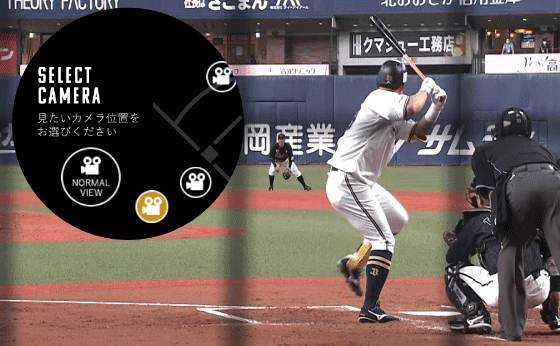
Q7: I would like to use "Multi-Angle VOD."
You can enjoy it from the [Multi-angle VOD button] on the LIVE streaming page. (Only for some matches)
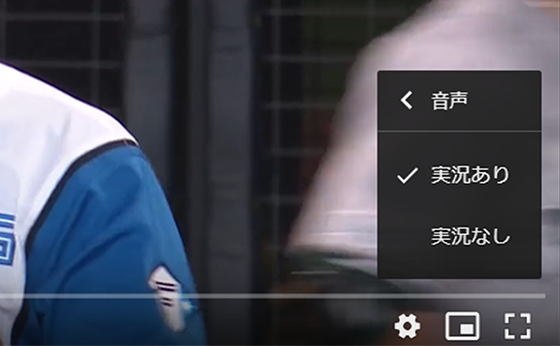
Q8: I want to listen to the sound from inside the venue only.
You can enjoy the live broadcast by clicking the [Live broadcast ON/OFF button] on the LIVE broadcast page. (Only for some matches)
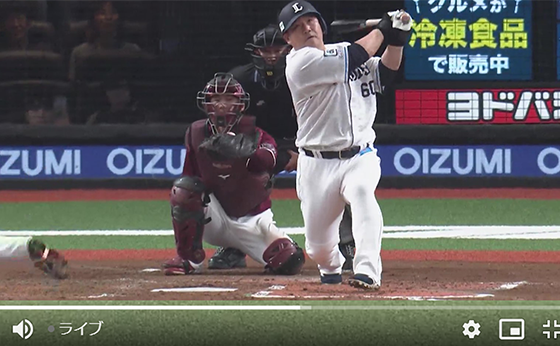
Q9: I want to use the "Live Position Adjustment Button."
You can enjoy it by clicking the [Live Position Adjustment Button] on the LIVE streaming page.
*Some devices/OS may not be available.
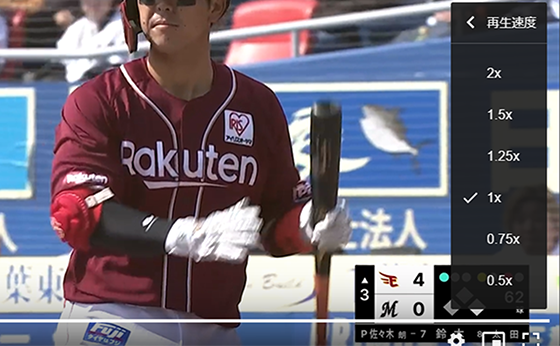
Q10: I want to adjust the speed of live playback.
You can enjoy the live broadcast by adjusting the playback speed on the LIVE broadcast page.
*Some devices/OS may not be available.
Q11: I want to watch videos while other apps are open.
Click on the "Picture in Picture" button in the video player.
*Some devices/OS may not be available.
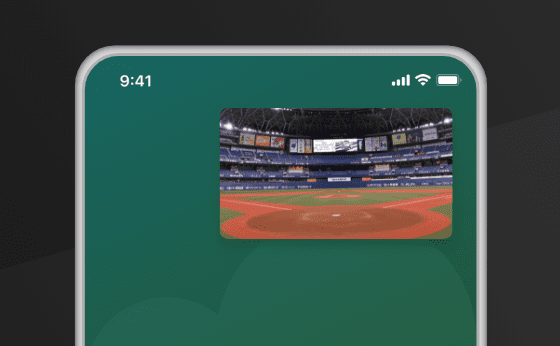
Q12: The video won't play.
(1) Check your internet speed using an internet speed test.
To enjoy watching Pacific League TV in full HD, we recommend an internet connection speed of 6Mbps or higher.
If the internet connection is poor, the video quality may decrease or the video may be interrupted.
To check your internet connection status, Speed test Please try this. You can check if your internet connection meets the recommended speed.
*This link will take you to another company's website.
*Please measure using the device and environment in which you are watching the video.
* Please take the measurement several times and refer to the average value.
Even if your test result is less than 6Mbps, you can still watch the content, but your viewing experience may be compromised.
Please refer to the troubleshooting steps below and try them to see if they can improve your internet speed.
(2) If you think the problem is with your communications environment, please try the following solutions.
■ Solution
- If you are using Wi-Fi, try restarting your router. Also, check to see if there are any problems with the router itself.
- Place your router closer to your device.
- Try temporarily blocking other devices from using the same network.
- If you are using a mobile device, please avoid areas with many tall buildings, crowded places, basements, or high floors.
(3) If there are no problems with the recommended environment or communication environment, please try the following solutions.
■ Solution
- Please check if you can watch other video viewing apps on your device.
- If you are using the app, please update the app to the latest version.
- If you are using a browser, please update your browser to the latest version. Also, please try using a different web browser to see if the video can be played.
- Please try restarting your browser or app.
- Please try reinstalling the app.
- Please update your device to the latest OS version.
- Please try restarting your device.
- If there are any applications or software, such as security software, that you are not using, try disabling or deleting them.
(4) If the message "HLS playlist request error at URL name" is displayed, playback may not be possible due to insufficient memory or high CPU usage.
If you have unnecessary tabs in your smartphone's browser, please try this at your own risk after deleting them.
If there are unnecessary apps running in the ground on your smartphone, please close them at your own risk before checking.
Please clear your browser's cache and check again.
If you have multiple software programs running, please close them before checking. (e.g., Excel, Word, Webex, Zoom, Skype, etc.)
(5) Temporary files (cache) may be the cause.
Please delete it according to the browser you use using the method below.
Chrome: [Options] → [Advanced Settings] → [Clear browsing data]
Android: [Menu] → [Other] → [Settings] → [Clear cache]
Safari: Tools → Edit → Empty Cache → Empty
(6) This may be due to a proxy.
If you are using a proxy, please remove it.
(7) If JavaScript is not enabled in your browser settings
Unable to run application. Please enable JavaScript.
(8) If cookies are disabled
To use some functions, you must enable cookies. The method for enabling cookies varies depending on the device, browser, and version.
Please see below for details.
For Chrome, click here
For Safari/iPhone, click here
For Microsoft Edge, click here
For Firefox click here
(9) Incognito mode
If you are watching in incognito mode, the video may not play.
We apologize for the inconvenience, but please disable incognito mode to watch the video.
Q13: The video plays, but I can't hear the audio.
If your phone is set to silent mode, you may not be able to hear the audio. Please turn off silent mode before watching.
Q14: My communication speed has slowed down.
The highest image quality is 6Mbps (1080p), and will automatically switch to 6Mbps (1080p), 4Mbps (1080p), 2Mbps (720p), 1.2Mbps (540p), or 300kbps (360p) depending on your communication environment.
*If you watch live matches in high resolution on your smartphone or tablet, more than 2.5GB of data will be used per match.
*Please be aware of the daily and monthly data usage limits when watching using LTE, 4G, or 5G lines on a smartphone or tablet, or when watching via tethering.
*We recommend using a Wi-Fi connection for long viewing periods.
Q15: When I played the video, an error message appeared.
(1) An authentication error occurred (4030001, 4030002)
A communication error has occurred, so please reload the page.
Please try again from the match schedule page.
(3) Viewing on multiple devices detected (5000003)
This message appears when you try to watch on multiple devices. You cannot watch on multiple devices at the same time. If you want to watch on a different device, please try again 15 minutes after finishing watching on the previous device.
(4) You do not have permission to view this content (5000004)
Please register as a paid member of Pacific League TV.
To register: Here
(5) This live broadcast has ended (5000007)
The live broadcast has ended, so please return to the top page.
Q16: Player images and information are not displayed.
If the information is not updated, it may be due to temporary files (cache). Please delete them according to the method below for your browser.
Chrome: [Options] → [Advanced Settings] → [Clear browsing data]
Android: [Menu] → [Other] → [Settings] → [Clear cache]
Safari: Tools → Edit → Empty Cache → Empty
If the information is not updated even after checking the above, please contact us using the contact address at the bottom of the page. Please be sure to let us know the URL of the page or part that is not updated.
5. Questions about changing registration/settings
Q1: I can't log in.
Your email address (login ID) or password may not have been entered correctly. Passwords are case-sensitive, so please pay attention to capitalization and try logging in again.
*If you registered using your email address and password, please enter your email address and password on the login page to log in. *If you are using the old Pacific League Live TV, the login method is different. Please log in using the link provided on the [Login] page.
Q2: I forgot my password.
Click [Forgot your password? Click here] to reset your password.
*Please note that the procedure differs depending on whether you are already logged in/registered on Pacific League or if you are already a Pacific League TV member but have not yet logged in/registered on Pacific League.
Q3: Change your password.
Please make the changes by going to [Settings] > [Change Password].
*After changing your password, you will no longer be able to log in with your original password.
Q4: I want to check the status of my purchase.
Please check by going to [Settings] > [Check/change current plan].
If you cannot confirm the purchase status of the plan etc. on the page you are redirected to, it means that the purchase has not been made.
Q5:ファンクラブ割引価格で視聴したい
Please see here for details on how to watch at the fan club discount price.
Q6: I want to change my profile.
Please make changes by going to [Settings] > [Change Profile].
Q7: I want to change my credit card.
To make changes, go to [Settings] > [View/change current plan] > [Change payment method].
Q8: How can I stop receiving notification emails to my registered email address?
Please change your settings under [Settings] > [Email Newsletter]. By turning it "OFF", you can stop receiving email newsletters from Pacific League.
Q9: I would like to know the procedure for cancellation.
Please proceed by going to [Settings] > [Check/Change Current Plan] > [Cancel Pacific League Unlimited Viewing Pack].
*If you do not receive a cancellation confirmation notice, please log in again and check your registration information under [Settings] > [View/Change Current Plan].
If you can still watch paid videos after canceling your subscription, it means the process was not completed correctly, so please complete the above procedure again.
*You will no longer be able to watch the content once your subscription has been canceled.
*Billing will occur on the 1st of each month, so we recommend canceling at the end of the month.
Q10: I cannot cancel normally.
If it is difficult to cancel your contract using the above method, our office will carry out the procedure on your behalf. In that case, we will ask you to provide us with the following information to verify your identity:
・Full name (kanji or kana)
・Registered email address
·date of birth
- Prefecture of residence
・Desired cancellation date
Please specify, Send an email to the secretariat I would like
*It will take 3 days to 1 week for the cancellation process to be completed after we receive your cancellation request via email. Please note that we may not be able to cancel on the date you wish to cancel.
*Once the cancellation process is completed, you will no longer be able to watch the service, even if it is within the month. We would appreciate your understanding on this point.
*Even after cancellation, your registration information will remain and you will be able to log in as normal. Therefore, if you wish to purchase again after canceling your subscription, simply log in and make your purchase from My Page, and you will be able to start watching immediately.
※How to purchase Questions about new registration/login Please see.
Q11: I want to delete my free count.
Please proceed through [Settings] > [Other Settings] > [Delete count].
*If you are currently subscribed to Pacific League TV, please complete the cancellation procedure and then delete count.
6.Other
Q1: I want to know the app's version update history.
The app is versioned for each release.
After launching the app, please check the menu section.
Q2: About Pacific League Live TV
If you registered for the service via Yahoo! Wallet, your usage statement may show the old service name, "Pacific League Live TV."
For any questions, please contact us via email.
Q3:ソーシャルメディアへの試合動画違法投稿について
We have noticed numerous cases of match footage from this service being posted on social media, including Twitter, Instagram, YouTube, and TikTok.
All copyrights, neighboring rights, trademarks, patents, and other intellectual property rights related to the services we provide to users through this service belong to us or to the legitimate rights holder, and posting match footage from this service on social media without permission is prohibited by the terms and conditions.
If we find such behavior, we will terminate the contract for use of this service. In addition, such behavior is considered copyright infringement, and the rights holder may demand compensation for damages or file criminal charges. We appreciate your understanding.
Q4: If you have any further questions, please contact us by email.
メールアドレス :
Please note that it may take several days for us to respond to your email.
If you have spam filters set up, please allow emails from the following domain: "help.pacificleague.jp".
For inquiries regarding viewing, please contact us with the following information to ensure smooth response.
- Current situation
- Membership registration name
- date of birth
- Registered email address
- Device used (e.g. PC, smartphone, tablet)
- OS (e.g. Windows, Mac, Android, iOS, etc.)
- Browser (e.g. Chrome, Safari, FireFox)
- App version *For apps (e.g. version 1.0)
- Provider (e.g. Biglobe, Nifty)
- Viewing area (e.g. Fukuoka Prefecture)
- Other (e.g., does watching in slower speed mode improve anything?)